
How to set stop loss and take profit in MT5
Setting a stop loss and take profit in MetaTrader 5 (MT5) is the core risk management step that determines whether a trading strategy survives real market volatility or fails under pressure. In MT5, both tools are attached to orders to automatically close a position at predefined loss or profit levels, removing emotional decision making from execution. Understanding how to properly configure stop loss and take profit is not optional technical knowledge, it is a structural requirement for consistent trading performance.
This guide explains how to set stop loss and take profit in MT5 in a practical, platform specific way, while also breaking down how traders should calculate these levels using risk based frameworks rather than arbitrary price distances. It also connects execution mechanics with real trading logic so you are not just clicking buttons in a terminal, but building controlled exposure.
What stop loss and take profit actually mean inside MT5
A stop loss in MT5 is an automated exit instruction that closes a trade when price moves against your position by a specified amount. A take profit is the inverse, it closes the trade when price moves in your favor by a predefined level. According to Investopedia, a stop loss order is designed to limit an investor’s loss on a position in a security, while a take profit order locks in gains once a target price is reached.
In MT5, these are not abstract concepts. They are executable parameters attached directly to market or pending orders. When price hits either level, the platform sends a closing order automatically through the broker’s execution engine. This automation is critical because manual exits are often delayed by hesitation, slippage in decision making, or emotional bias.
MetaQuotes, the developer of MetaTrader 5, confirms that stop loss and take profit levels can be specified at order placement or modified later through the trade terminal or chart interface.
How to set stop loss and take profit in MT5 (desktop workflow)
On the desktop version of MT5, setting stop loss and take profit happens at the order ticket stage, although it can also be adjusted after execution.
When you open a new trade window, you are presented with fields for volume, symbol, order type, and price. Beneath or alongside these fields are inputs labeled “Stop Loss” and “Take Profit.” These values are entered in price terms, not pips or percentages. This distinction is important because many beginners mistakenly think in pip counts without translating them into actual market price levels.
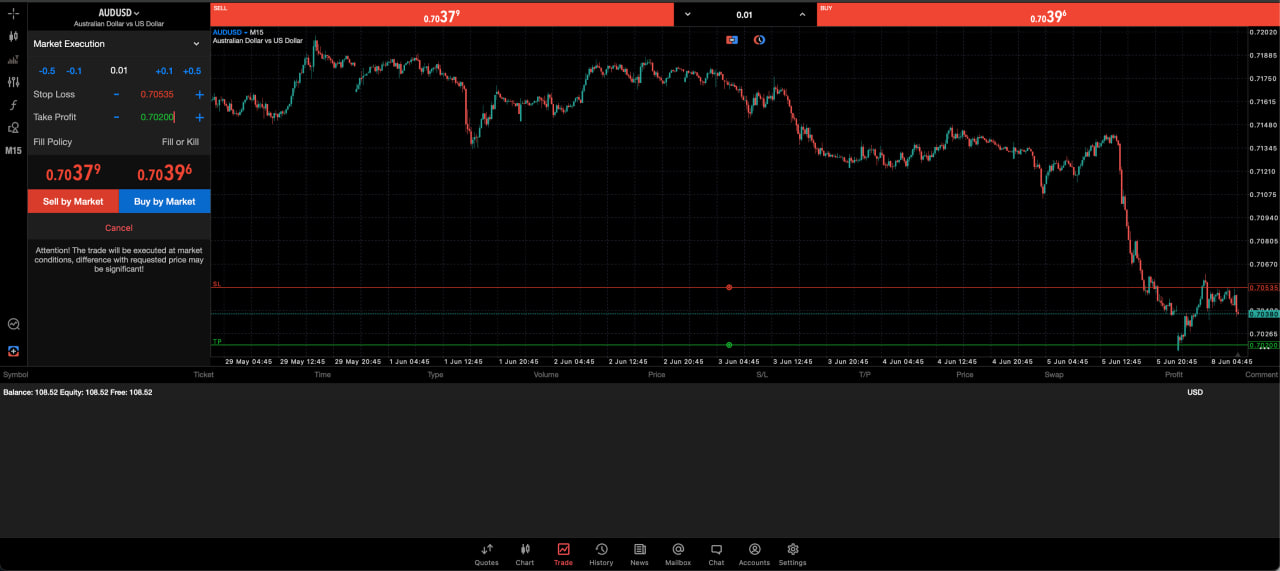
For a buy position, stop loss must be below the entry price, while take profit must be above it. For a sell position, the reverse applies. MT5 enforces this logic at the execution layer, meaning invalid placements are rejected or corrected depending on broker configuration.
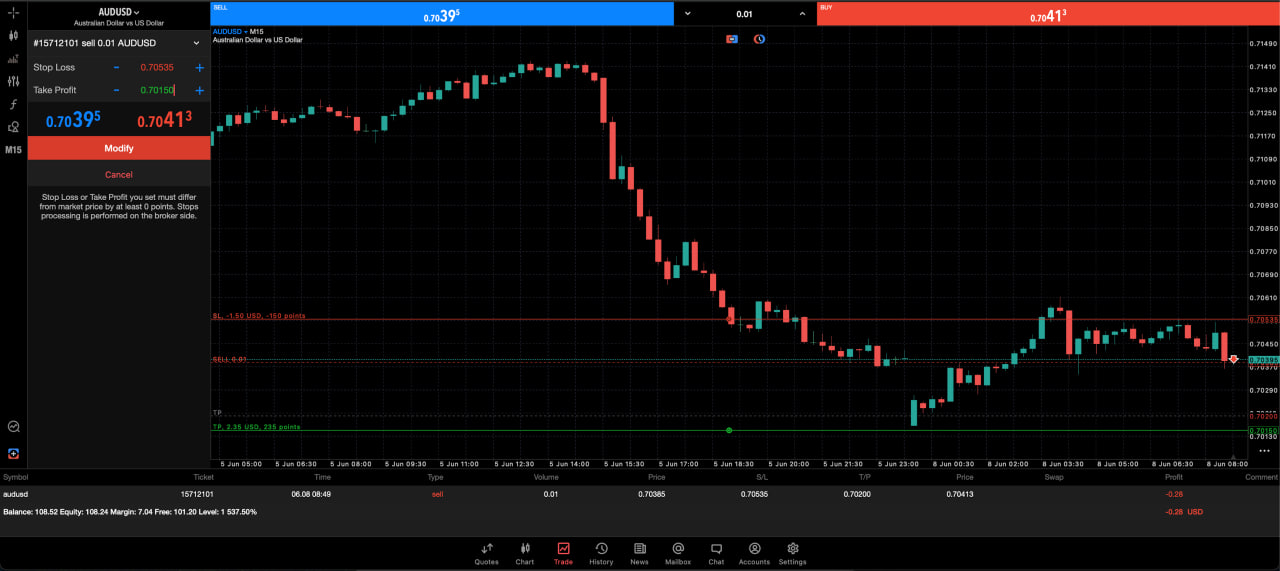
Once the trade is executed, you can visually modify both levels directly on the chart by dragging horizontal trade lines. This is one of MT5’s most practical features because it allows real time adjustment based on evolving price structure rather than static numerical input.
Setting stop loss and take profit on MT5 mobile
On mobile MT5, the process is similar but more constrained. After selecting a symbol and opening a trade, you are prompted to define volume and order type, followed by optional stop loss and take profit fields. Once the trade is placed, tapping on the position in the “Trade” tab allows modification.
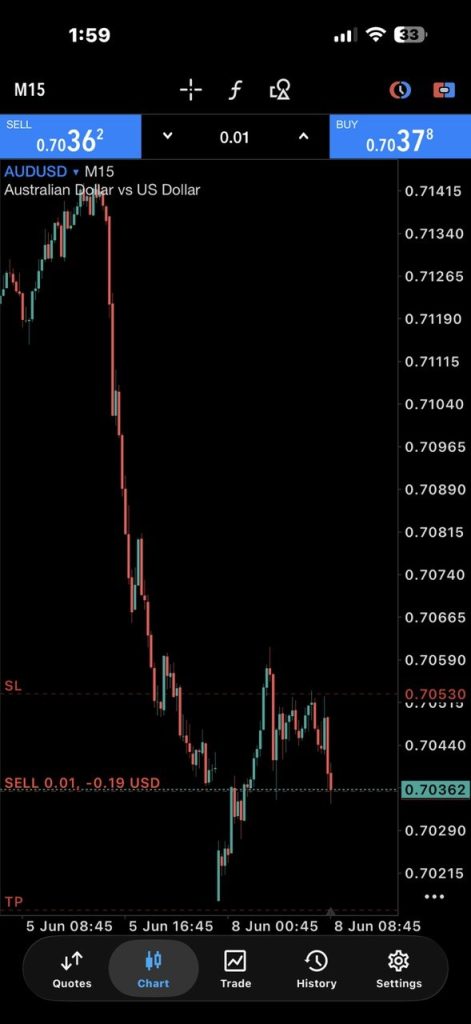
The mobile interface is designed for execution rather than analysis, so traders often make the mistake of setting arbitrary levels without contextual chart reference. This is where discipline breaks down. Proper stop loss and take profit placement should always be informed by structure, not convenience.
Why stop loss and take profit are not symmetric decisions
A common misconception is that stop loss and take profit should be equal distance from entry. In reality, they serve fundamentally different roles. The stop loss is a risk boundary, while the take profit is a probability weighted target.
Professional risk models often separate these two decisions. Risk is defined first, typically as a percentage of account equity, and only then is reward projected based on market structure. This is consistent with standard risk management principles used across financial markets, where position sizing and downside control are prioritized before upside targeting.
The key concept here is expectancy. A trading system does not need to win most of the time, but it must ensure that average wins exceed average losses over a large sample size.
How to calculate stop loss properly in MT5
MT5 itself does not calculate stop loss levels for you beyond enforcing minimum distance rules from brokers. The calculation is a trader’s responsibility.
A structured way to define stop loss begins with risk per trade. Many traders use a fixed percentage of account equity, commonly between 0.5 percent and 2 percent depending on strategy aggressiveness. This is not a platform rule but a widely adopted risk management convention in trading education and professional practice.
From there, stop loss distance is determined by market structure. This typically includes:
- Recent swing highs or lows
- Volatility expansion zones
- Support and resistance levels
- Indicator based boundaries such as ATR (Average True Range)
A practical example is using volatility to define stop distance. If an asset has an ATR of 50 points, placing a stop loss at 10 points is statistically fragile because normal price movement will likely trigger it.
The formula for translating risk into position size is:
Position size = (Account risk amount) ÷ (Stop loss distance in monetary terms)
MT5 supports this indirectly through its volume calculation tools, but the trader must supply the logic.
Take profit placement as a function of market structure, not fixed ratios
Take profit in MT5 should not be treated as a mirror of stop loss. Instead, it is derived from liquidity zones, prior market structure, or measured move projections.
One of the most common professional approaches is aligning take profit with areas where liquidity is likely to be captured, such as previous highs or lows. Another method is using risk reward ratios as a baseline constraint rather than a primary decision tool. For example, a 1:2 risk reward ratio means potential profit is twice the risk, but the actual level should still be anchored to technical structure.
Static ratios without structure often lead to premature exits or missed moves. MT5 allows partial closes and trailing stops, which can be used to manage evolving trades more dynamically rather than relying on fixed targets.
The 7 percent stop loss rule and why it is often misunderstood
The so called 7 percent rule suggests that traders should not risk more than 7 percent of their capital on a single position or series of positions. This concept is more commonly associated with broader portfolio risk guidelines rather than active intraday trading systems.
There is no universal regulatory rule enforcing 7 percent stop loss usage. Instead, it is a heuristic used in some trading education contexts to prevent catastrophic drawdowns. However, in leveraged markets like forex, risking 7 percent per trade would generally be considered excessively aggressive.
A more widely accepted professional standard is significantly lower, often 1 to 2 percent per trade, depending on strategy and leverage usage. This aligns with capital preservation principles emphasized in risk management literature across financial education sources.
The key takeaway is not the number itself, but the principle behind it: no single trade should be capable of significantly damaging account viability.
Common mistakes traders make when setting stop loss and take profit in MT5
One of the most persistent errors is placing stop loss levels based on arbitrary pip counts rather than structural analysis. This results in stops being too tight during high volatility conditions or too wide during low volatility environments, both of which distort risk consistency.
Another frequent mistake is moving stop loss levels further away after entry in an attempt to avoid being stopped out. This behavior breaks risk control logic and introduces asymmetrical downside exposure.
Traders also often neglect spread and execution latency. In MT5, the spread is already included in execution price, meaning stop loss placement too close to entry can be triggered by normal spread fluctuation alone.
Finally, take profit levels are often set without reference to liquidity or historical price reaction zones, resulting in trades closing before major moves fully develop.
Using MT5 tools to improve stop loss and take profit precision
MT5 provides several built in tools that help refine stop loss and take profit placement. The crosshair tool allows precise measurement of price distances, while the built in risk calculator (depending on broker integration) can estimate margin and exposure.
More advanced traders use indicators like ATR or custom scripts to dynamically adjust stop levels based on volatility. This prevents static positioning in rapidly changing markets.
The platform also supports trailing stops, which automatically adjust stop loss levels as price moves in favor of the trade. This is particularly useful in trending environments where fixed take profit levels may limit upside capture.
Stop loss and take profit as part of a system, not isolated settings
It is important to understand that stop loss and take profit in MT5 are not standalone features. They are components of a broader execution system that includes entry timing, position sizing, and market context interpretation.
Without a defined system, stop loss and take profit become random price anchors rather than risk control mechanisms. With a system, they become mechanical enforcement tools that ensure consistency across trades.
Setting a stop-loss is only part of good risk management. Pair your stop distance with our Position Size Calculator to determine an appropriate trade size, then use the Profit & Loss Calculator to estimate your potential risk and reward.
Why execution discipline matters more than strategy complexity
Most trading failures do not come from incorrect directional analysis, but from poor risk control. MT5 provides the infrastructure to enforce discipline automatically, but it does not enforce logic. That responsibility remains with the trader.
Stop loss and take profit settings are the final layer between analysis and outcome. When used correctly, they reduce cognitive load and remove emotional interference. When used incorrectly, they create false confidence in a system that is not statistically grounded.
Setting stop loss and take profit on LQH Markets
Every MT5 account on LQH Markets supports the full stop loss and take profit functionality covered in this guide. At order placement, by modifying open positions in the trade terminal, or by dragging the trade lines directly on the chart.
The execution mechanics work the same way across our account types, so whichever account fits your style, the risk management framework you build carries across. Stop loss and take profit execute at broker level the moment price hits your defined threshold, so you’re not relying on manual exits when you’re away from the screen.
If you’re refining your stop loss placement or testing how a strategy handles real volatility, our demo account uses the same MT5 environment as live trading, with real market pricing and execution conditions.
LQH Markets supports crypto-funded trading accounts, allowing traders to deposit with selected cryptocurrencies for a faster and more flexible funding experience.
Open an account or start with a demo.
Risk Disclaimer
CFDs are complex instruments with a high risk of losing all your invested capital. Only trade with money you can afford to lose. Content is for general information only and is not investment advice.
FAQs
How do I put take profit and stop loss on MT5?
You can set stop loss and take profit directly in the MT5 order window before placing a trade by entering price levels in the SL and TP fields. You can also modify them after execution by right clicking the open position or dragging the trade levels on the chart. MetaQuotes confirms this functionality as part of standard MT5 order management.
How do I set stop loss and take profit correctly?
Correct placement is not based on fixed distance but on market structure and volatility. Stop loss should be placed beyond invalidation points such as swing highs or lows, while take profit should align with liquidity zones or measured moves. Risk per trade should also be defined before selecting levels.
How to calculate stop loss in MT5?
MT5 does not calculate stop loss automatically beyond enforcing minimum distance rules. Calculation is based on risk per trade and market structure. Traders typically determine account risk first, then translate that into price distance using position sizing formulas.
What is the 7 percent rule for stop loss?
The 7 percent rule is a general risk guideline suggesting that no single position or exposure should risk more than 7 percent of capital. It is not a formal MT5 rule or regulatory requirement. Many professional traders actually use lower thresholds such as 1 to 2 percent per trade for better capital preservation.
Can I change stop loss and take profit after placing a trade in MT5?
Yes, MT5 allows full modification of both stop loss and take profit after execution. You can adjust them through the trade terminal or directly on the chart by dragging the trade levels. This flexibility is designed to support dynamic trade management.