
Short answer: MT4 is a lightweight trading platform designed primarily for forex traders, while MT5 is a more advanced multi asset platform with additional order types, faster strategy testing, more timeframes, and improved analytical tools. For most new traders, MT5 is the better long term choice unless you specifically need an MT4 only broker, indicator, or expert advisor.
MetaTrader 4 (MT4) and MetaTrader 5 (MT5) are two of the most widely used trading platforms in the world. Both were developed by MetaQuotes, both support manual and automated trading, and both are available across desktop, web, and mobile devices. You can see the official product pages for MetaTrader 4 and MetaTrader 5 on MetaQuotes’ website.
Despite the similar names, MT5 is not simply an updated version of MT4. The platforms were built with different goals in mind. MT4 was designed primarily for forex trading, whereas MT5 was created as a multi asset platform capable of supporting forex, stocks, indices, commodities, futures, and cryptocurrencies.
If you’re deciding between MT4 and MT5, understanding the differences can help you choose the platform that best suits your trading style, preferred markets, and long term goals.
MT4 vs MT5 at a glance
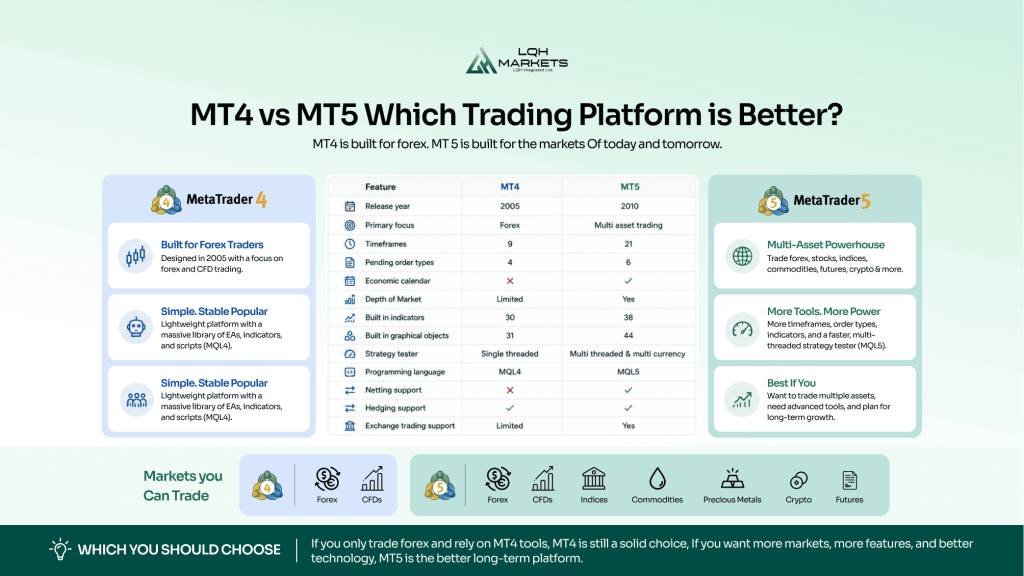
| Feature | MT4 | MT5 |
| Release year | 2005 | 2010 |
| Primary focus | Forex | Multi asset trading |
| Timeframes | 9 | 21 |
| Pending order types | 4 | 6 |
| Economic calendar | No | Yes |
| Depth of Market | Limited | Yes |
| Built in indicators | 30 | 38 |
| Built in graphical objects | 31 | 44 |
| Strategy tester | Single threaded | Multi threaded and multi currency |
| Programming language | MQL4 | MQL5 |
| Netting support | No | Yes |
| Hedging support | Yes | Yes |
| Exchange trading support | Limited | Yes |
What is MT4?
MetaTrader 4 is an electronic trading platform released by MetaQuotes in 2005. It quickly became the industry standard for retail forex trading because of its stability, simplicity, and support for automated trading through Expert Advisors (EAs). The official MT4 platform page still describes it as a widely used solution for forex and CFD trading.
Although MT4 can be used for CFDs and other financial instruments depending on the broker, its architecture was originally built around the forex market.
Many experienced traders continue using MT4 because they already own custom indicators, trading robots, or scripts developed in MQL4. For traders with a large existing library of tools, switching platforms can mean extra development work and testing.
What is MT5?
MetaTrader 5 was launched in 2010 as the successor to MT4. Rather than replacing MT4 entirely, MetaQuotes redesigned the platform to support a wider range of financial markets and more advanced trading functionality. The official MT5 platform page highlights its multi asset design and broader feature set.
MT5 includes additional charting tools, more technical indicators, an integrated economic calendar, improved order management, and a significantly faster strategy tester.
The platform also introduced the MQL5 programming language, which allows developers to build more sophisticated automated trading systems. MetaQuotes’ MQL5 documentation explains the language structure, classes, and trading functions in detail.
Today, many brokers choose MT5 because it supports a broader range of asset classes while continuing to provide the familiar MetaTrader experience.
Key differences between MT4 and MT5
Although the platforms look similar, several important differences affect how traders use them.
Supported markets
One of the biggest differences is the range of assets each platform can support.
MT4 was developed with forex trading in mind. Most brokers also offer CFDs through MT4, but exchange traded products are generally not supported.
MT5 was designed as a genuine multi asset platform. Depending on your broker, you may be able to trade:
- Forex
- Stock CFDs
- Cash indices
- Commodities
- Precious metals
- Cryptocurrencies
- Futures
- Exchange traded stocks
If you plan to diversify beyond currencies, MT5 provides considerably more flexibility. It is also the better choice if you want to explore strategies such as short selling through supported brokers. If that is part of your plan, our guide to MT5 short selling for beginners explains how short positions work and what risks to watch for.
Charting and technical analysis
Both platforms offer professional quality charting, but MT5 expands significantly on what is available.
| Feature | MT4 | MT5 |
| Timeframes | 9 | 21 |
| Technical indicators | 30 | 38 |
| Analytical objects | 31 | 44 |
| Unlimited charts | Yes | Yes |
| Custom indicators | Yes | Yes |
The additional timeframes alone make MT5 attractive for many traders.
For example, MT5 includes:
- 2 minute charts
- 3 minute charts
- 6 hour charts
- 8 hour charts
- 12 hour charts
These extra intervals can help traders analyse price action with greater precision without relying on custom indicators. For traders who use multi timeframe analysis, this can be a meaningful advantage.
Order types
MT4 supports four pending order types:
- Buy Limit
- Sell Limit
- Buy Stop
- Sell Stop
MT5 adds two more:
- Buy Stop Limit
- Sell Stop Limit
These additional order types provide greater flexibility when planning entries during volatile market conditions. They can be especially useful when you want to trigger a trade only after price reaches a certain level and then confirms a second condition.
If you want a deeper explanation of how stop orders differ, see our guide on stop loss vs stop limit. That article explains why the two order types are often confused and when each one makes sense.
Economic calendar
A major advantage of MT5 is its integrated economic calendar.
Instead of checking external websites, traders can monitor upcoming economic announcements directly inside the trading platform. MetaQuotes provides the feature through its economic calendar, which is built into the MT5 ecosystem.
Major releases such as inflation reports, employment data, GDP figures, and central bank decisions can all influence market volatility.
Official economic data is published by government agencies and central banks, making it an important consideration for both technical and fundamental traders. If you trade around news events, having the calendar inside the platform can save time and reduce the chance of missing a high impact release.
Depth of Market
MT5 includes a full Depth of Market (DOM) window. Depth of Market displays available buy and sell orders at different price levels, helping traders understand liquidity around the current market price.
While retail traders should not treat DOM as a complete representation of global liquidity, it can provide useful insight on brokers that support exchange traded markets.
MT4 has only limited support for this feature, which is another reason MT5 is often preferred by traders who want a more advanced market view.
Strategy testing
This is one of the biggest improvements introduced with MT5. MT4’s Strategy Tester can only test one currency pair at a time using a single processing thread.
MT5 introduced:
- Multi threaded testing
- Multi currency strategy testing
- Faster optimisation
- Distributed cloud computing support
- More detailed performance reports
MetaQuotes’ Strategy Tester documentation shows how the newer tester is designed for more complex backtesting and optimisation workflows.
For traders developing automated systems, these improvements can dramatically reduce optimisation times. If you run multiple parameter combinations or test across several symbols, MT5 is usually far more efficient.
Programming language
MT4 uses MQL4.
MT5 uses MQL5.
Although the languages appear similar, they are not compatible. An Expert Advisor written for MT4 cannot simply be copied into MT5. Likewise, MT5 robots generally require substantial redevelopment before they will function on MT4.
This remains one of the biggest reasons why some experienced traders continue using MT4, particularly if they have invested heavily in custom software. If you already have a large library of indicators or EAs, migration can take time and testing.
Hedging vs netting
Another important difference is how each platform handles positions. MT4 is built around hedging, which means you can hold multiple positions in the same instrument at the same time, including both buy and sell trades.
MT5 supports both hedging and netting, but the account type depends on the broker. In a netting account, positions in the same instrument are combined into a single net position. This is common in exchange style trading environments.
For traders who want to open several separate positions on the same pair, hedging is often more familiar. For traders who prefer a cleaner single position view, netting can be easier to manage.
This is one of the most practical differences between MT4 and MT5, especially for traders who use position scaling or partial exits.
MT4 vs MT5 performance
Both platforms are well optimised and relatively lightweight. However, MT5 was built using a more modern architecture.
Benefits include:
- Better memory management
- Faster execution of complex calculations
- Improved multi core CPU utilisation
- Better handling of multiple charts
- Faster optimisation of trading strategies
For traders running several charts simultaneously or testing automated systems, these improvements become noticeable. MT5 is generally the better choice if you want a platform that can take advantage of newer hardware.
Automated trading
Both MT4 and MT5 support algorithmic trading.
Automated systems can:
- Execute trades automatically
- Monitor markets continuously
- Apply consistent trading rules
- Remove some emotional decision making
However, MT5 generally offers more advanced capabilities thanks to the MQL5 language and improved testing environment.
If you’re learning algorithmic trading today, many developers recommend starting with MT5 rather than MQL4 due to its modern object oriented programming features. It is also easier to build more complex systems when you have access to better testing tools and more flexible order handling.
Which platform has more indicators?
MT4 includes:
- 30 built in indicators
- Thousands of third party custom indicators
MT5 includes:
- 38 built in indicators
- Thousands of custom indicators
- Additional analytical tools
While MT4 has accumulated a huge community over nearly two decades, the MQL5 ecosystem has grown rapidly and now offers an extensive marketplace for indicators and Expert Advisors.
That said, if you already rely on a specific MT4 indicator, compatibility matters more than raw feature count. In practice, the best platform is often the one that supports the tools you actually use.
Mobile trading
Both platforms provide mobile apps for Android and iOS. The experience is broadly similar across both platforms, allowing traders to:
- Open and close positions
- Monitor markets
- Analyse charts
- Receive push notifications
- Manage pending orders
MT5 generally feels more modern and offers additional functionality, although many traders find both mobile apps perfectly adequate for day to day trade management. If you mainly use mobile for monitoring and quick execution, either platform can work well.
Which brokers support MT4 and MT5?
Although MT4 remains widely available, an increasing number of brokers now prioritise MT5.
This trend has accelerated because MetaQuotes has focused development on MT5 for several years while reducing support for MT4.
Many brokers now offer:
- MT5 only
- Both MT4 and MT5
- Proprietary trading platforms alongside MetaTrader
Before opening an account, always check which platforms your broker supports, particularly if you intend to use existing indicators or automated strategies. Platform availability can vary by region, account type, and asset class.
Is MT4 being discontinued?
MT4 has not been completely discontinued, but its future is limited. MetaQuotes officially stopped selling new MT4 licences to brokers several years ago and has concentrated platform development on MT5. Existing MT4 brokers continue operating, but most new platform features and updates are introduced exclusively for MT5. This does not mean MT4 will suddenly stop working. Many brokers still support it, and a large number of traders continue using it successfully. However, traders starting from scratch should recognise that MT5 is now the platform receiving ongoing innovation.
MT4 advantages
MT4 remains popular because it offers several benefits:
- Simple interface
- Large online community
- Extensive library of Expert Advisors
- Huge collection of custom indicators
- Low hardware requirements
- Familiar workflow for experienced traders
For forex only traders using older automated systems, MT4 still performs extremely well. It is also a practical choice if your broker, indicator, or EA is MT4 specific and you do not want to rebuild your setup.
MT5 advantages
MT5 provides a wider range of modern features:
- Supports multiple asset classes
- More timeframes
- More order types
- Built in economic calendar
- Depth of Market
- Faster strategy testing
- Improved programming language
- Better performance on modern computers
These improvements make MT5 the preferred choice for many traders entering the market today. It is also the better platform if you want to expand into more advanced workflows, including multi asset analysis and more sophisticated automation.
Should beginners choose MT4 or MT5?
For most beginners, MT5 is usually the better option.
It offers more analytical tools, supports more markets, receives ongoing development, and prepares traders for a wider range of trading opportunities.
MT4 still has value if:
- Your broker only supports MT4.
- Your trading strategy depends on an MT4 only indicator or Expert Advisor.
- You are already familiar with the platform and have no reason to switch.
Otherwise, most new traders will benefit from learning MT5 from the beginning. Starting with the newer platform can reduce the need to migrate later, especially if you eventually want to trade more than just forex.
Can you switch from MT4 to MT5?
Yes, but the switch is not always seamless.
You can open a new MT5 account with a broker that supports it, but your MT4 indicators, scripts, and Expert Advisors will not automatically transfer. In many cases, they need to be rewritten in MQL5 or replaced with MT5 compatible alternatives.
If you are switching because you want better charting, more timeframes, or multi asset access, MT5 is usually worth the move. If your current MT4 setup is working well and you depend on legacy tools, it may be better to transition gradually.
Risk disclaimer
CFDs are complex instruments with a high risk of losing all your invested capital. Only trade with money you can afford to lose. Content is for general information only and is not investment advice.
Using MT5 with LQH Markets
For traders deciding between MT4 and MT5, the choice ultimately comes down to the markets, features and trading tools they need. LQH Markets offers MetaTrader 5 as its trading platform, providing access to a broad range of instruments alongside advanced charting, multiple order types and other features designed for modern multi-asset trading.
Traders can practise their approach using a demo account, then transition to live markets through a trading account when they are ready.
Ready to get started? Open a live LQH Markets account or start with a demo account.
Final thoughts
MT4 helped define modern retail online trading and remains one of the most recognisable platforms ever created. Its simplicity, reliability, and enormous ecosystem explain why millions of traders still use it today.
However, MT5 represents the future of the MetaTrader ecosystem. With broader market support, improved performance, enhanced analytical tools, and ongoing development from MetaQuotes, it is the platform most traders should consider if they are starting today.
Ultimately, the right choice depends on your broker, preferred markets, and trading objectives. If you already rely on MT4 specific tools, there may be little reason to switch immediately. If you’re building new trading skills or planning to trade multiple asset classes, MT5 is likely to provide greater flexibility over the long term.
If your trades are frequently stopped out before price reverses, it may also be worth reading our guide on why your stop loss gets hit. Good platform choice matters, but risk management matters even more.
Frequently asked questions
Is MT5 better than MT4?
For most traders, yes. MT5 offers more features, better strategy testing, additional order types, more timeframes, and support for more financial markets. MT4 remains a solid choice for traders who rely on legacy tools or forex focused workflows.
Can I use the same account on MT4 and MT5?
Usually not. Brokers typically provide separate account types for each platform because they use different server infrastructure.
Can MT4 indicators work on MT5?
No. MT4 indicators written in MQL4 are not directly compatible with MT5. They normally need to be rewritten or converted into MQL5.
Does MT5 replace MT4?
Not completely. MT5 is the newer and more advanced platform, but MT4 is still widely used and supported by many brokers.
Does MT5 support hedging?
Yes, MT5 can support hedging, but it depends on the broker and account type. Some MT5 accounts use hedging, while others use netting.